


Cloudspire Assist
Live AI coaching cards and a running transcript while you handle queue calls in your browser.
Cloudspire Assist is an AI-powered real-time coaching feature for call queue agents. When enabled on a queue, agents receive live guidance cards and a running transcript directly in their Customer Portal during active queue calls, helping them handle calls more effectively without leaving their workflow.
Cloudspire Assist is configured by your administrator on a per-queue basis. If none of your queues have Assist enabled, you will not see the Assist panel.
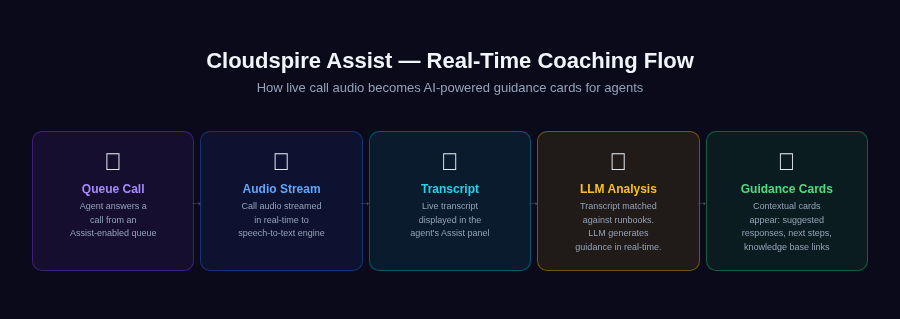
How Assist works: call audio streams to speech-to-text, then LLM analysis generates real-time guidance cards
How It Works
With the Voice Portal open and connected, Assist needs no further action from you:
- A queue call rings your phone and you answer it in the browser softphone.
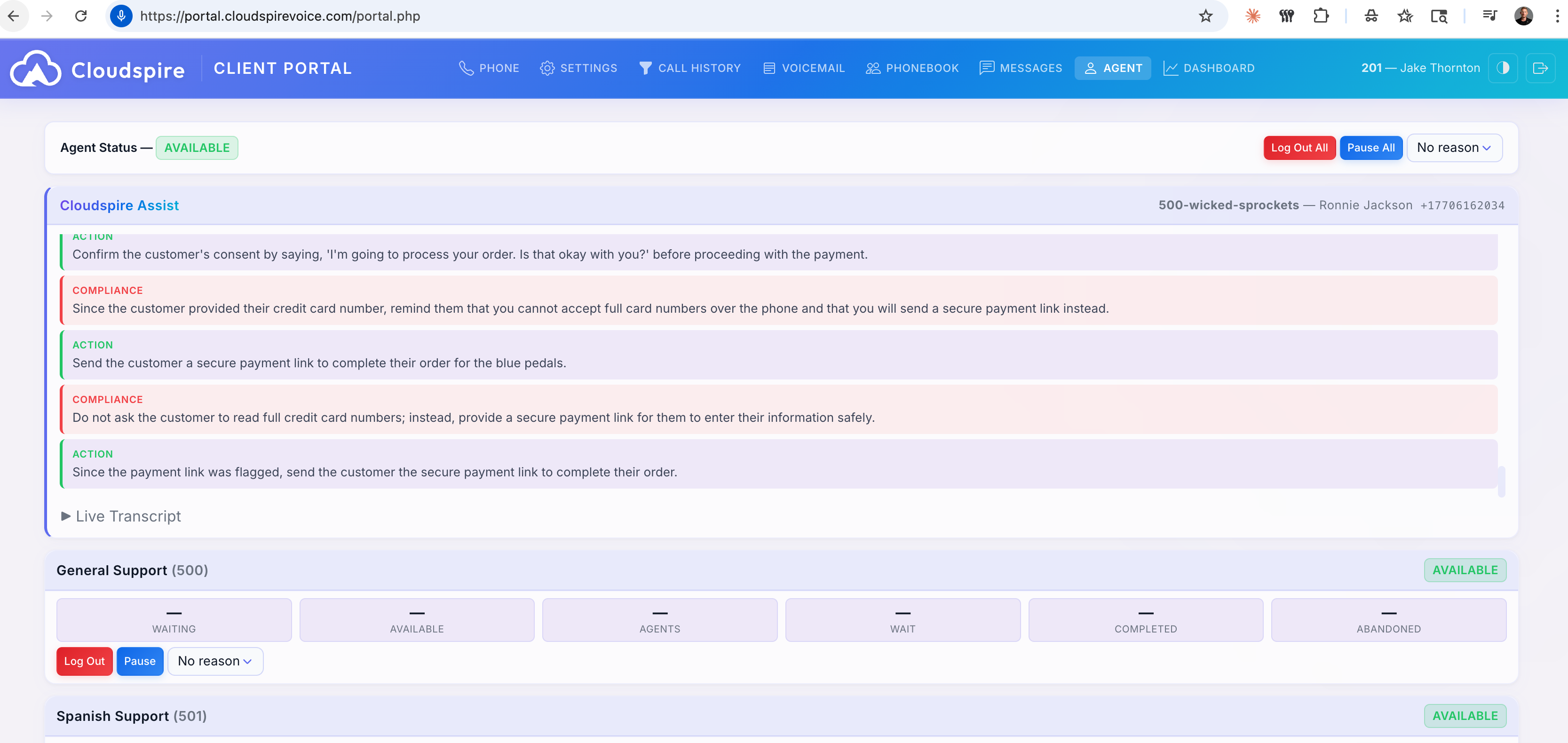
- On the Agent tab, the Assist panel appears inline at the top of the page, above your queue cards, giving you the full-width view with guidance and transcript side by side.
- On any other tab, a compact floating popup appears in the bottom-right corner so you can continue working while still receiving live guidance.
- As the conversation progresses, guidance cards appear in real time based on what is being discussed.
- A collapsible live transcript shows the conversation flow so you can review what was said.
- When the call ends, the Assist panel automatically disappears and resets for your next call.
You do not need to start, stop, or configure anything else. Assist activates and deactivates automatically based on your call state.
The Assist Panel
The Assist panel appears in two forms depending on where you are in the portal:
- Agent tab: Full-width inline panel at the top of the page. Guidance cards and the live transcript are displayed prominently with maximum screen space.
- All other tabs: A compact floating popup fixed to the bottom-right corner of the screen. This allows you to navigate the portal freely (checking call history, managing voicemail, or updating settings) while still receiving real-time guidance during an active call.
Both views show the same content and update in real time. The panel contains two sections:
- Guidance Cards: Color-coded cards with contextual advice, actions, and reminders that appear as the conversation unfolds.
- Live Transcript: A collapsible section showing the real-time conversation between you and the caller.
The panel is designed to be glanceable; cards are concise so you can absorb guidance quickly without losing focus on the caller.
Guidance Cards
Guidance cards are delivered in real time based on the AI’s analysis of the live conversation. Each card is color-coded by type so you can instantly identify what kind of guidance it provides:
| Card Type | Color | Purpose |
|---|---|---|
| Action | Green | A specific step to take, for example, offering a promotion, scheduling a follow-up, or transferring the caller to another department. |
| Compliance | Red | A required disclosure, disclaimer, or regulatory reminder that must be communicated to the caller during the conversation. |
| Info | Cyan | Relevant background information, such as account details, product specifications, or policy references that may help you answer the caller’s question. |
| Suggestion | Blue | A recommended approach or talking point, for example, empathy phrases, upsell opportunities, or alternative solutions to consider. |
Cards appear as new topics come up in the conversation. New cards are added at the bottom of the list and the panel scrolls down to bring them into view, so the most recent guidance is always the last card. Earlier cards remain visible so you can scroll back up if needed.
Live Transcript
The Live Transcript section shows the conversation in real time as it happens. Each entry is labeled to indicate whether the speaker is the Agent (you) or the Caller.
The transcript is collapsible; click the header to expand or collapse it. This lets you keep it hidden to reduce visual clutter and expand it only when you need to review something that was said earlier in the call.
The transcript updates automatically as the conversation progresses. You do not need to refresh or take any action to keep it current.
Auto-Hide Behavior
The Assist panel is only visible while you are on an active queue call with an Assist-enabled queue. When the call ends:
- The Assist panel automatically disappears from the Agent tab.
- All guidance cards and transcript content from the previous call are cleared.
- Your Agent tab returns to its normal view showing queue cards and performance metrics.
When your next Assist-enabled queue call begins, a fresh panel appears with no content carried over from previous calls.
An Assist session also ends during a call if you close the browser (or the portal loses its connection) for more than about a minute. The call itself continues normally; only the coaching stops, and it does not resume for that call if you reopen the browser. Leave the portal open for the duration of any call you want coached.
Notes
- Cloudspire Assist is only available during queue calls on queues where your administrator has enabled the feature. Direct calls and outbound calls do not trigger the Assist panel.
- Guidance cards are generated by AI and are advisory in nature. Use your judgment in applying the suggestions to each conversation.
- Compliance cards (red) indicate items your organization has flagged as required; treat these as mandatory disclosures or actions.
- The Assist panel does not affect your phone or call controls. You answer, hold, transfer, and hang up calls the same way as always.
- If you navigate away from the Agent tab during an active Assist call, the floating popup appears so you never lose sight of live guidance. Return to the Agent tab to see the full-width inline view again.